
Making a deposit on E7777 Game is straightforward for Pakistani players. The deposit section provides JazzCash and Easypaisa as payment methods, along with several instant deposit channels. According to the current deposit screen, users can enter an amount manually or select one of the available preset amounts. The minimum deposit shown is Rs 100, while the maximum deposit is Rs 50,000.
This E7777 Game deposit guide explains the complete process, including how to select a payment method, choose an instant deposit channel, enter your amount, complete the payment confirmation, and make sure your wallet information is entered correctly.
E7777 Game Deposit Methods
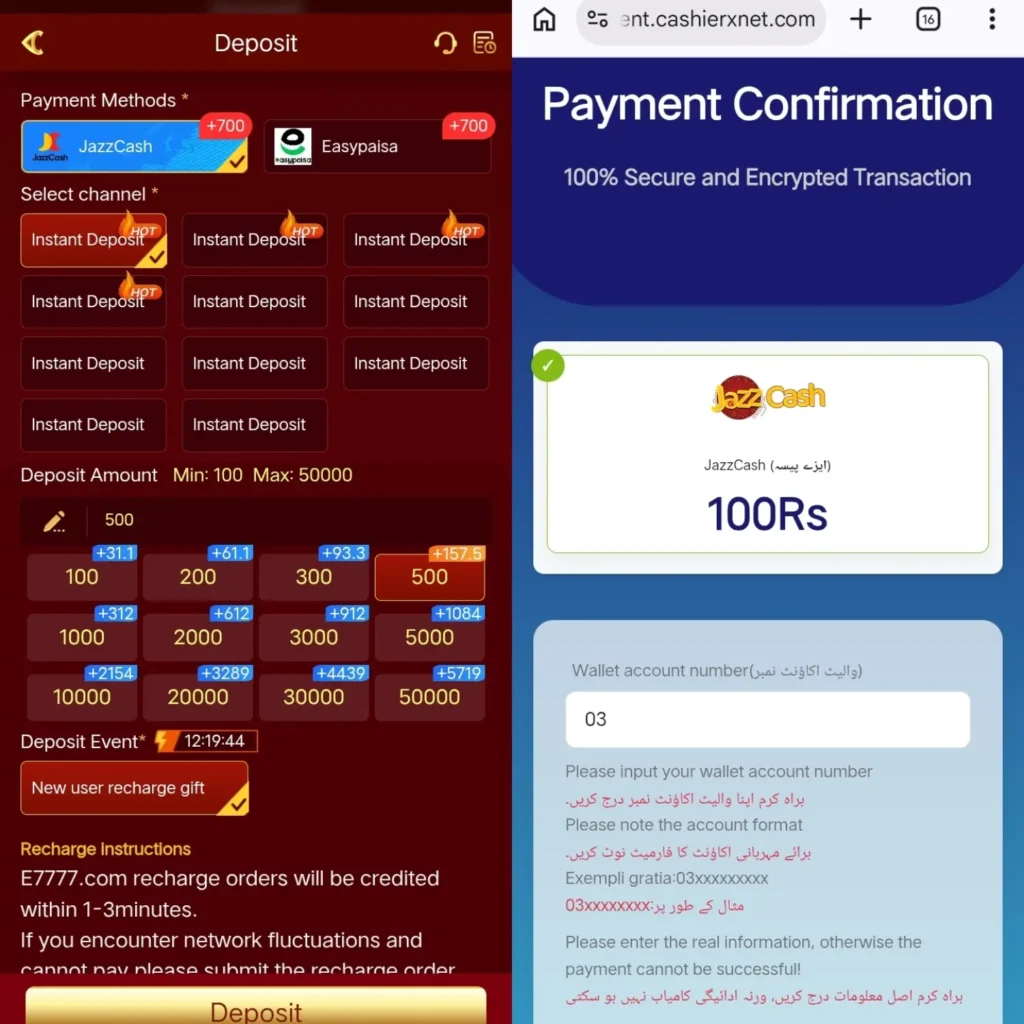
E7777 Game currently displays two main payment methods:
- JazzCash
- Easypaisa
Both options are shown in the deposit section. After selecting a payment method, users can choose from the available instant deposit channels.
For Pakistani users, JazzCash and Easypaisa are familiar mobile payment options, making the deposit process relatively simple.
E7777 Game Minimum and Maximum Deposit
The E7777 Game deposit screen shows:
- Minimum deposit: Rs 100
- Maximum deposit: Rs 50,000
You can type your preferred amount into the deposit amount field or select one of the preset amounts.
The available preset amounts shown on the screen include:
- Rs 100
- Rs 200
- Rs 300
- Rs 500
- Rs 1,000
- Rs 2,000
- Rs 3,000
- Rs 5,000
- Rs 10,000
- Rs 20,000
- Rs 30,000
- Rs 50,000
If your desired amount is not shown as a preset option, you can enter the amount manually, provided it falls within the displayed deposit limits.
How to Deposit on E7777 Game?
Follow these steps to make an E7777 Game deposit.
Step 1: Open E7777 Game
Log in to your E7777 Game account and open the wallet or deposit section.
Select the Deposit option to start the recharge process.
Step 2: Select Your Payment Method
Under Payment Methods, select either:
- JazzCash
- Easypaisa
Choose the payment method you want to use for your deposit.
Step 3: Select an Instant Deposit Channel
After selecting JazzCash or Easypaisa, the available payment channels will appear. Select one of the Instant Deposit options. Some channels may be marked as HOT on the deposit page.
The exact channels available can change depending on the payment system and current availability.
Step 4: Enter Your Deposit Amount
Enter the amount you want to deposit. For example, if you want to deposit Rs 500, enter 500 in the amount field or select the Rs 500 preset button.
Remember that the displayed limits are Rs 100 minimum and Rs 50,000 maximum.
Step 5: Check the Deposit Event
The E7777 Game deposit page also displays a Deposit Event section. The screenshot shows a New User Recharge Gift option. If a deposit promotion is available on your account, check the displayed conditions before completing the transaction.
Promotional amounts and eligibility can change, so users should always check what is shown on their own deposit screen.
Step 6: Continue to Payment Confirmation
After submitting the deposit order, you may be taken to a Payment Confirmation page.
The payment page shown in the current E7777 Game deposit process displays JazzCash information and asks for a wallet account number. Enter the required wallet number carefully. For JazzCash, the example format shown is:
03xxxxxxxxx
Make sure the wallet number you enter matches the account you are using for the payment.
Step 7: Complete the Payment
After entering the required wallet information, follow the instructions displayed on the payment confirmation page.
Send the required amount through the selected payment method and make sure the transaction information is correct before confirming the payment.
Step 8: Wait for the Deposit to Credit
The E7777 Game deposit screen states that recharge orders will be credited within 1–3 minutes.
If the balance does not appear immediately, allow some time for the payment to process before submitting another deposit order.
E7777 Game Deposit with JazzCash
JazzCash is displayed as one of the main payment methods on E7777 Game.
To deposit through JazzCash:
- Open the E7777 Game Deposit section.
- Select JazzCash.
- Choose an available Instant Deposit channel.
- Enter your deposit amount.
- Continue to the payment confirmation page.
- Enter your JazzCash wallet account number.
- Check the displayed payment details.
- Complete the payment.
- Return to E7777 Game and check your balance.
The payment confirmation screen shown in the current deposit process displays JazzCash and asks users to provide their wallet account number. Always enter your actual wallet number rather than using an incorrect or incomplete number.
E7777 Game Deposit with Easypaisa
Easypaisa is also displayed as a payment method in the E7777 Game deposit section.
The general process is similar:
- Log in to E7777 Game.
- Open Deposit.
- Select Easypaisa.
- Select an available Instant Deposit channel.
- Enter your desired amount.
- Continue with the payment instructions.
- Enter the required wallet information.
- Complete the Easypaisa payment.
- Check your E7777 Game balance after the transaction.
Available payment channels can change, so follow the options currently displayed inside your account.
E7777 Game Deposit Bonus
The E7777 Game deposit screen includes a Deposit Event section with a New User Recharge Gift.
- The screen also displays additional amounts alongside several preset deposit values. These promotional figures can vary according to the deposit option, account status, campaign, or current promotion.
- Before making a deposit for a bonus, read the promotion shown inside the E7777 Game account. Pay particular attention to any requirements attached to the offer.
- A promotional balance should not automatically be treated as withdrawable cash because individual bonus conditions may apply.
E7777 Game Deposit Amounts
The preset deposit buttons make it easier to select commonly used amounts.
| Deposit Amount | Displayed Deposit Option |
|---|---|
| Rs 100 | Available |
| Rs 200 | Available |
| Rs 300 | Available |
| Rs 500 | Available |
| Rs 1,000 | Available |
| Rs 2,000 | Available |
| Rs 3,000 | Available |
| Rs 5,000 | Available |
| Rs 10,000 | Available |
| Rs 20,000 | Available |
| Rs 30,000 | Available |
| Rs 50,000 | Available |
The minimum shown on the page is Rs 100 and the maximum is Rs 50,000.
How Long Does an E7777 Game Deposit Take?
The recharge instructions displayed on the E7777 Game deposit page state that recharge orders will be credited within 1–3 minutes. In some situations, payment processing may take longer because of network or payment-system issues.
If your payment has been completed but the balance has not appeared, avoid making another payment immediately. First check the transaction status and payment information.
What to Do if E7777 Game Deposit Is Pending?
If your E7777 Game deposit is pending, check the following:
- Confirm that the payment was actually completed.
- Check that you used the correct JazzCash or Easypaisa account.
- Confirm the amount you paid.
- Check whether the payment confirmation page was completed.
- Wait for the stated processing period.
- Keep your transaction details until the balance is credited.
The E7777 Game deposit page specifically mentions network fluctuations as a possible issue affecting recharge orders.
Common E7777 Game Deposit Problems
Deposit Does Not Appear
If your balance does not update, first check your payment transaction and allow the stated processing time.
Wrong Wallet Number
Entering an incorrect wallet number can cause payment problems. Carefully check your JazzCash or Easypaisa account number before submitting the payment.
Payment Channel Not Working
E7777 Game can display multiple Instant Deposit channels. If one channel is unavailable, check whether another available channel is displayed.
Deposit Amount Is Rejected
Check that the amount is within the displayed Rs 100–Rs 50,000 range.
Network Problem
A weak internet connection or payment-network interruption can delay the process. Wait until the connection is stable before trying again.
Tips for a Safe E7777 Game Deposit
Before making an E7777 Game deposit, follow these basic precautions:
- Use only the payment details displayed in your current deposit session.
- Check the wallet number before sending money.
- Confirm the deposit amount before payment.
- Keep your transaction record.
- Do not share your account password or payment PIN.
- Do not send money to payment details received from unknown people.
- Check bonus conditions before depositing specifically for a promotion.
- Avoid making duplicate payments while an earlier transaction is still pending.
Final Words
The E7777 Game deposit process is based around JazzCash and Easypaisa, with several Instant Deposit channels available. The current deposit page shows a Rs 100 minimum and Rs 50,000 maximum, while preset options range from Rs 100 to Rs 50,000.
For a smooth E7777 Game deposit, select the correct payment method, choose an available channel, enter the correct amount, carefully check your wallet information, and follow the payment confirmation instructions. The page states that successful recharge orders are normally credited within 1–3 minutes, although payment or network issues can sometimes cause delays. Check our register guide on e7777 game, if you are struggling to sign up for the game.
FAQs
What is the minimum E7777 Game deposit?
The E7777 Game deposit page currently shows a minimum deposit of Rs 100.
What is the maximum E7777 Game deposit?
The maximum deposit displayed on the current E7777 Game deposit page is Rs 50,000.
Can I deposit with JazzCash?
Yes. JazzCash is displayed as a payment method in the E7777 Game deposit section.
Can I deposit with Easypaisa?
Yes. Easypaisa is also displayed as a payment method.
How do I deposit Rs 100 on E7777 Game?
Open Deposit, select JazzCash or Easypaisa, choose an available Instant Deposit channel, select or enter Rs 100, and follow the payment confirmation instructions.
How do I deposit Rs 500 on E7777 Game?
You can enter 500 in the deposit amount field or select the Rs 500 preset option and then continue with the displayed payment instructions.
How long does E7777 Game take to credit a deposit?
The recharge instructions shown on the deposit page state that recharge orders will be credited within 1–3 minutes.
What should I do if my E7777 Game deposit is delayed?
Check your payment details and transaction status first. If the payment has been completed, allow additional processing time and keep your transaction information available.
Does E7777 Game have a new-user deposit offer?
The current deposit screen displays a “New User Recharge Gift” under Deposit Event. The exact eligibility and promotional conditions should be checked inside the account before depositing.
Can I choose a deposit amount manually?
Yes. The deposit page provides an amount field where you can enter your desired amount, subject to the displayed minimum and maximum limits.